Showing posts with label Internet-setup. Show all posts

Saturday, July 2, 2011

How to make mobile as modem & connect to internet using Bluetooth.


How to make your mobile as modem, how to connect to internet through Bluetooth,how to connect to internet using Bluetooth in windows 7 and windows XP,How to connect to internet without the help of PC suite,how to setup internet connection using Bluetooth in windows 7/windows XP,trick to connect internet using Bluetooth directly without help of PC suite,how to setup dial-up connection for cellphones.pairing of computer with bluetooth,Manual Bluetooth internet connection.How to connect to mobile broadband,.Connect Bluetooth internet from Nokia,Samsung,sony Ericsson,Idea,Vodafone,Aircel,Airtel,Max mobile,Uninor,Spice mobile,Tata docomo,Tata indicom,Micromax,Karboon,Dell,HTC many more

Last post we saw about how to setup internet using USB cable, now we'll see how to connect internet using Bluetooth.

Prerequisites for connecting internet through Mobile:
1) Make sure that your mobile can act as modem (90% of the phones which are available acts as modem)
2) Get the PC suite/Pc companion for your mobile phone
3) Turn on your mobile & laptop/computer Bluetooth.
4) Get the internet settings from your service provider.

Install PC suite first, because your computer has to detect your phone.

Pairing Your computer & Cell phone for the first time using Bluetooth.
1) Right click on system tray,select the bluetooth icon & go to Show Bluetooth device.

If you find, your mobile name appearing there, then right click on the device & do remove device
2) Then again right click on system tray,select the Bluetoth icon & go to add a device.


Computer will Search all available Bluetooth devices, select the appropriate one.

After selecting, pairing code will appear on computer screen.Some mobile may ask you to enter the pass code in mobile, some may ask you to ensure the code printed on screen is matching with the one your mobile is showing.

Once you finish the above step, computer try to configure your device.after that you will get confirmation in your mobile that Your mobile act as modem & PC can acces mobile etc..close the screen once the configuration is complete.


Steps to connect internet using Bluetooth:
1) Follow the above method first step i.e Right click on system tray,select the bluetooth icon & go to Show    Bluetooth device
Right click on your phone-->Dial up networking-->Create Dial-up


Then Select your Bluetooth Modem.


Dial up connection screen appears, enter the Dial up connection number
For Eg: vodafone karnataka Dial up number is *99***1#


8) Then click on connect, you will get a dialing screen & connection will get registered on the network.
    this may take 2 or 3 seconds, later you will get a screen. connection successful.   


The active Dial-up connection can be found at,
Control Panel---> Network and Internet --> NetworkConnections. 

To disconnect the internet connection Just right click on the active connection and click disconnect.

The above setup needs to be done at first time only, later on you just have turn on both Mobile & laptop/computer Bluetooth, system will automatically pair it, while pairing system automatically sends instructions to your mobile. once auto pairing is done,
go to Control Panel---> Network and Internet --> Network Connections. 

Double click on the Bluetooth Dial up connection which you had configured previously.


Then a screen appears, just click on dial, it will connect to internet automatically.
Happy browsing :)
is this information usefull? please provide us feedback.

Information about how to connect internet through USB is available here


How to make mobile as modem & connect to internet using USB.


How to make your mobile as modem, how to connect to internet through USB,how to connect to internet using data cable in windows 7 and windows XP,How to connect to internet without the help of PC suite,how to setup internet connection using data cable in windows 7/windows XP,trick to connect to internet using USB Directly,how to setup dial-up connection for cellphones.Connect USB internet from Nokia,Samsung,sony Ericsson,Idea,Vodafone,Aircel,Airtel,Max mobile,Uninor,Spice mobile,Tata docomo,Tata indicom,Micromax,Karboon,Dell,HTC many more

Are you struggling to connect to internet through PC suite?
Don't worry, here is the simple step to connect internet from USB Data cable directly without the help of PC suite.

Prerequisites for connecting internet through Mobile:
1) Make sure that your mobile can act as modem (90% of the phones which are available acts as modem)
2) Get the PC suite/Pc companion for your mobile phone
3) Keep the Data cable ready with you.
4) Get the internet settings from your service provider.

Install PC suite first, because your computer has to detect your phone.


Steps to connect internet using USB data cable:
1)Go to start-->Control Panel-->Network and Internet-->Network and sharing center.
2)Click on Set up a new connection or network.
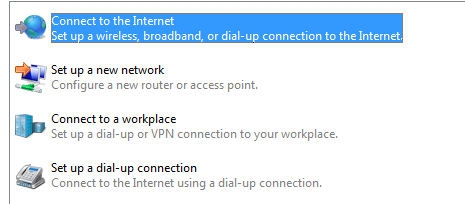
3)Select Connect to internet.


4)Dont worry about pre-configured dial up connection, select Create new connection and press next.


5)Then it will ask you How do you want to connect? Choose Dial-up option.


6)Click on your phone, which acts as modem.


7)Enter the Dial-up phone number,if you dont no the number please call up your service provider and get it.
     For Eg: Vodafone karnataka Dial-up number is "*99***1#"
     You can keep user name & password blank, its up to you.


8) Then click on connect, you will get a dialing screen & connection will get registered on the network.
    this may take 2 or 3 seconds, later you will get a screen. connection successful.   


The active Dial-up connection can be found at,
Control Panel---> Network and Internet --> NetworkConnections. 


To disconnect the internet connection Just right click on the active connection and click disconnect.

The above setup needs to be done at first time only, later on you just have to plug in your mobile to computer/laptop through USB & go to Control Panel---> Network and Internet --> Network Connections. 

Double click on the Dial up connection which you had configured previously.


Then a screen appears, just click on dial, it will connect to internet automatically.

Happy browsing :)
is this information usefull? please provide us feedback.

How to connect to internet using Bluetooth connection is available here